
Quick note: Want to make money with a brand new blog? It’s an in-depth article that includes few tried and tested ways to make money.
Who else wants to get 1000+ visitors per day?
Hands down, every beginner blogger wants it.
Do you know the ONE reason why most people quit blogging?
Lack of traffic.
I know how it hurts when no one reads your blog.
If I had to start over again, I would do the same things that you’re going to explore now.
Why 1,000 visitors per day?
It’s a magic number. If you’re getting 1,000+ visits each and every day means you’re on your way to make some serious business online. Traffic is money baby!
AND
You can attract more leads, likes, shares and affiliate income once you hit that magic number.
Let me tell you the truth (read hard truth), 95% of the blogs don’t reach that number. They eventually die with lack of traffic.
But here’s the good news.
If you’re looking for ways to getting 1000+ visitors a day and ready to put some serious efforts, I’ll share few proven ways to get long lasting traffic. If you’re searching for “fastest ways to get 1,000 visitors per day” – this post is NOT for you.
Grab a cup of coffee, this post is going to be a bit long..
Proven ways to get 1000+ visitors per day

Write long, thorough blog posts
Small blog posts have no future.
Read it again.
Give your readers something to tweet about.
Neil Patel says the average content length for a web page that ranks in the top 10 results for any keyword on Google has at least 2,000 words.

The research says it all – lengthy content is the king. Not just any content.
[Tweet “Ask yourself a question before writing any post – would anyone email this article to a friend? – Leo Widrich”]
Most blogs fail to get traffic because of ONE simple reason. They don’t create pillar articles. Pillar articles are the cornerstones of any successful blog.
A pillar article is something that is;
- well researched
- 2,000+ words (yes, seriously – you and me are not a Seth Godin!)
- relevantly linked to other blogs
- full of actionable tips
In short, a pillar article is something where your readers take immediate action after reading be it sharing, commenting, linking or subscribing to your blog.
Online people simply don’t have time to read blogs. They want STRONG reasons to read any blog. What else could be the better reason than creating something that is worth implementing? Now you might ask, I’m already creating good enough content.
Listen – good enough content is not good enough.
It must be epic. It must solve your readers’ problems, create curiosity and ignite them to take action.
Focus on your readers’ frustrations first. Find out what they are struggling with. Then provide solutions to their problems through your blog posts. This is how to build a popular blog.
One more thing.. without targeting a specific audience, getting 1,000 visitors a day is useless. You’ll never see any increase in subscribers, traffic, or sales whatsoever. Focus on one specific reader.
Before you even think about getting 1,000 visitors and more, stop and ask yourself: Who am I writing to?
Now, let’s move on to the next section.
Focus on reader interaction instead of visits
[Tweet “One loyal reader is worth 1,000 normal visitors.”]
When you’re starting from scratch to get 1,000 visitors a day – try NOT to focus on “blog traffic”, focus on reader interaction.
Reader interaction includes;
- leaving comments on your blog posts
- sharing your posts
- subscribing to your email lists
- linking to your sites
- taking your interviews
- buying your products etc
So how to increase reader interaction on your blogs?
Start treating your blog visitors like your family.
Enough said!
The 80/20 rule of blog promotion
According to Pareto principle, 80% of consequences stem from 20% of causes.
Apply the same rule to get 1,000 visitors a day to your blogs. Go and figure out where your targeted audiences are gathering online.
Is it Facebook, twitter, blog forums or other top blogs?
Open your Google analytics data.
Go to Traffic sources >> Sources >> All traffic
Analyze your top 5 traffic sources.

The top 3 to 5 traffic sources to your sites are your golden spots. Focus more on your top traffic sources to boost your website traffic instead of focusing on “new” traffic sources. Sure.. you can experiment various traffic sources, but only if you’re getting quality and consistent traffic.
Answer these two questions to apply Pareto’s rule to get 1000+ visitors per day.
- What are your top 5 traffic sources?
- Are you spending quality time on the top 5 sources to boost your traffic?
Are you getting me?
Okay now let’s jump into the next tip.
Focus on one traffic source at a time
If everything is important, then nothing is.
If there’s only one secret to get more website traffic it is this: focus on one traffic source at a time. Most bloggers, especially the noobs spend their time on getting traffic from all the traffic sources like Google, Facebook, twitter, LinkedIn etc.
Here’s the truth – you won’t get any traffic if you focus on every single traffic source. At least this strategy won’t work if you are concerned about long term results.
Give it a try once, focus on one traffic source at once.
Set up the basic framework – make your blog SEO friendly
[Tweet “The success of a page should be measured by one criteria: Does the visitor do what you want them to do?”]
Is your website you properly optimized for the search engines?
Tip: Use this tool to figure out whether your site is optimized or not. If not, here’s what you need to do to make your blog SEO friendly.
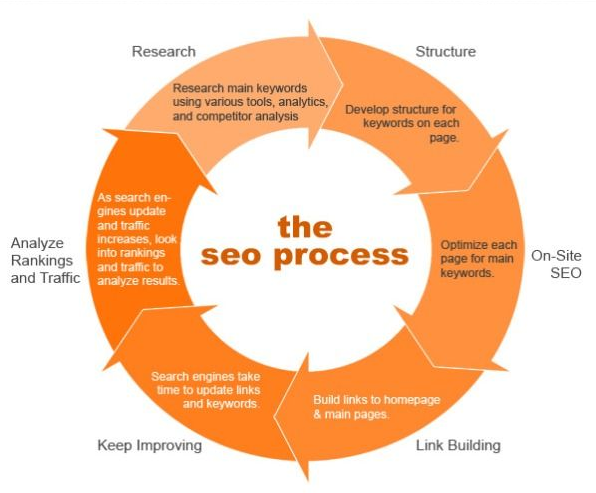
The 3 elements play a vital role in making your blog SEO friendly (to attract more links, shares, comments and traffic).
- Design: Make it easy to navigate your content. People love to stick to your blogs if you make it extremely easy to read. Clean up your sidebar (it can make or break your conversion rates). See my blog’s sidebar. A clean sidebar provides more white space thus helps your visitors focus on your content, which is the most important aspect of your blog success. And don’t forget to nail your website loading speed.
- Keywords: Keywords are the foundation for your SEO efforts. Figure out your top 5 keywords and use them sparely on every post you write. Use LSI keywords (synonyms) that Google uses to determine a page’s relevancy and quality. Find LSI keywords using “Searches Related to..” at the bottom of Google search results or by entering your keywords into the Google keyword planner.
- Backlinks: Backlinks are the backbones of any successful website. The more quality backlinks you’ve the more organic traffic you can generate. Simple as that. Here’s the sneaky tip to get more backlinks.

Build strong connections with other bloggers
Blogging is not a solo thing.
If you don’t hookup with others, you can’t drive more traffic. Simple as that.
Before building relationships with the influencers in your niche, do two simple things.
- Create a list of A list bloggers (aka authority bloggers like Darren Rowse, Brian Clark, Neil Patel, Yaro Starak etc.
- Create a list of B list bloggers in your niche (aka “influential bloggers” who will soon occupy the “authority space”)
After creating the above two lists, follow this step-by-step guide to getting your 1000 visits a day.
Step 1: Leave thoughtful comments
Blog commenting is the surest way to build relationships. It also sends you quick traffic from other sites if you leave thoughtful comments instead of just saying great post.
Step 2: Frequently link to their blog posts
I’ve a simple logic to get more comments, links or shares on ANY blog.
- Want more blog comments? Start commenting on other blogs
- Want more shares on your posts? Start sharing others posts first
- Want more links to your sites? Link to other bloggers articles and do it often
- Want more email subscribers? Read this post ;)
CLAPS!
Step 3: Suggest them blog post ideas (Use emails or twitter)
When I first started blogging, I used the same strategy. Whenever I want to grab someone’s attention, I go through their blog posts thoroughly (including each and every comment) and suggest them “award winning blog post ideas”. I’ll either email or DM them on twitter.
The idea is simple. Focus on one blog at a time, read their posts, and suggest blog post ideas.
Step 4: Email them whenever you link and ask for a tweet or share
I think this is the most effective yet underused strategy to grow your blog traffic. Whenever you link to someone’s blog post, email them about it. Email them that you mentioned their stuff.
Want a sample on how to send an effective email that gets a reply from BUSY bloggers?
Hey [name],
How are you doing? I know you’ve been doing a great job by creating link-worthy content, and it’s always pleasure to read your posts.
In my recent article on “getting 1000 visitors a day” – I linked to one of your posts. And I hope your readers and fans will definitely love it.
I’d appreciate if you tweet about the post!
Best,
[Your name]
That’s it!
See.. you’re not asking them to blog about the post or leave a blog comment. You’re asking them just a tweet.
If they find your post interesting, they’ll definitely return you the favor. What happens when most influential bloggers share your posts?
BOOM! Your traffic explodes.
What if they don’t tweet or share your posts?
Repeat the process. Write great stuff, link to their posts, email them!
Step 5: Either guest post on top blogs or conduct interviews of authority bloggers
Most new bloggers say – “Yes, I know dude.. guest blogging is the most effective way to get more blog traffic. But I don’t have enough experience to land on top blogs with my guest posts”.
If you’re one among them – here’s the simple strategy “conduct interviews of influential bloggers in your industry” and ask them to share on their networks once the interview goes live.
Or if you’re blogging for awhile, you already know that guest blogging is not a scary thing.. keep doing it but on TOP blogs that have good number of email subscribers. Don’t write guest posts just because some has a better Alexa or page rank.
Become a frequent guest blogger on top sites to effectively leverage their traffic. One of my favorite bloggers Jane Sheeba does this very well.
Social sharing influences search results
Whether you agree or not, social media is the king. One of the easiest ways to get 1,000+ visitors a day as a beginner is to use social media wisely. Connect with the power users of social media.
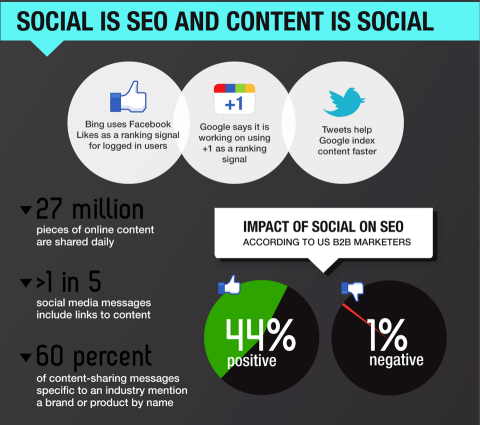
After you create your profile start following other people. Here are few smart ways to use social media to boost your blog traffic.
Use “1/3, 1/3, 1/3 rule”
Do you know why most new bloggers won’t get any attention even after promoting their posts like hell?
They promote *only* their posts. In fact, they don’t know the importance of promoting others stuff.
Listen – when you are building a brand for yourself, you can’t do it alone. You need to leverage others audience too.
- Spend 1/3 time on promoting “others” stuff
- Spend 1/3 time on promoting “your” stuff
- Spend 1/3 time on interaction (asking questions to know your readers’ interests)
If you’re starting out, I’d suggest you to promote 70% of others stuff on your Facebook walls, twitter id’s or Google+ pages (stop self-promotion). Sooner the people who you are promoting will also share your posts. Win/win approach.
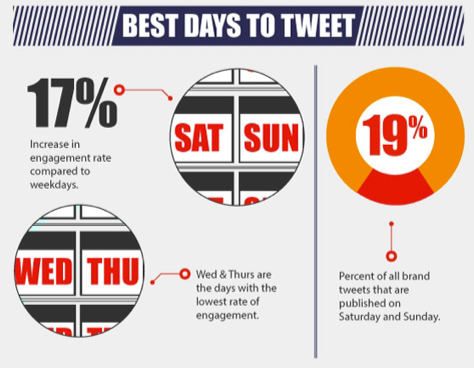
Know when to tweet
How much time does it take to get 1000+ visitors a day?
It depends on your niche. We can divide any blog into two categories;
- niche that needs less updates (viz SEO/SEM, IM, Web design blogs)
- niche that needs frequent updates (viz technology, news, entertainment etc.)
What’s your niche? Type 1 or 2?
For type 2 blogs: if you’re really consistent in providing quality stuff, it won’t take more than 4-5 months to hit the magic number.
Type 1 blogs take much time than 2 (to reach 1,000+ visitors mark).
You know the reason. The more updates, the more traffic.
One more step you can’t skip is to making your site responsive. If your site is not mobile responsive yet, consider using a free plugin like WP Touch. According to a recent survey conducted by QuickSprout over 50% of people are now using smart phones or tablets to browse online information. If your blog is not mobile responsive, you are losing them!
Still reading?
You’re awesome. Most people give up just when they’re about to see the growth on their blogs to make money blogging or drive more traffic. Have a look at this image..

Don’t give up. If you follow the tips mentioned above and put some serious efforts – you easily get 1,000+ visitors every single day. I guarantee.
Getting 1000+ visitors a day – Take away
I can go on and on and on but this is probably the 100th post you are reading on increasing website traffic. You probably won’t remember or follow even a single advice written in this post. You’ll just feel happy reading most of these tips and go on doing what you were doing before reading this anyways.
Unless you work hard and follow the advice no matter how many posts you read, it won’t amount to much. It will only help you sleep over your problems and procrastinate more. There’s a simple formula for blogging success: execute what you learn.
Do you’ve a second?
It took me more than 10 hours to finish this post. It only takes 1 second to share with others. Can you spend a second on sharing it? Click on any of the sharing button on the left side.
Do you have any proven strategies to get 1000+ visits a day? Please share your thoughts in the comments.
Hey Rahul
This is really awesome, I love to read your articles because they have new actionable tips that I never heard before. I’m waiting for an article about Why you don’t use AdSense or other advertising program on this blog.
Hi Rajiv,
Google AdSense? You earn peanuts from huge traffic.
Other ads? I’m more concerned about getting clients to make money than using ads. But I do promote affiliate stuff through my newsletters :)
Don’t compare adsense to peanuts please.
Adsense is not working on your site because your site is on blogging, seo ,sem niche. And people following these types of blogs are webmasters and are aware of adsense and other ad networks. So they will never click on ads.
Just recall the last time you clicked on ads in this niche….. ;)
Adsense works like a charm in tech blogs..where you can see many relevant ads,,and people there also are not so geeky like we are in our niche (seo, etc) .
For example- On a mobile review page, like “micromax canvas hd review” you will most likely click on a nokia lumia display ad iniside a post, thinking it to be a part of content..
I tried AdSense from other niches (tech, news related) as well. It’s still peanuts when compared to affiliate marketing or selling direct ads. Again, you have to bring huge traffic to make more money from GA.
Adsense is like peanut when you compare it to aff marketing, That I agree.
hehe.. that’s what I wanted to convey ;)
No doubt this is a great guide for someone who is interested in taking their blog traffic to next level. You have covered each and every aspect in detail.
I would love to hear more from you. Thanks so much for stopping by Anil!
How is Labnol doing so good with less than 500 words? It ranks on top, it gets a million visitors and 95% of the articles are less than 500-600 words. Serious doubt.
Good question Anchit. Labnol is an authority site.
Well established sites rank well in Google search results no matter what their content size is :)
Labnol was registered around 2004
Now only the domain age is enough for Google to trust anything on that domain.
And many people link to his articles, just pick one and check it yourselves.
Awesome post Rahul, I didn’t even miss a word. Your tone was awesome especially in starting and ending.
I followed one of your points from above article, that was to take interview of authority bloggers.
So I contacted you a month ago, but I got no reply after your agreement.
I know you are a busy blogger but I am hoping to hear from your side.
Btw thanks for the post.
Pramod, can you please send me it over again? Thanks for reading LBT :)
Hey Rahul,
Awesome content, The given methods are really useful. All these methods to drive 1000+ readers a day are awesome.
Social media is a great place, but forums are also awesome to drive targeted traffic to the blog and we have to apply 1/3,1/3,1/3 rule….. :)
This method is great and really works ;)
Thank you for sharing this… :)
Try those methods and let me know if you notice any changes :) Thanks for stopping by Nikhil.
Thanks Rahul for this long detailed post, to me i have been doing some of the listed tips here but still i dont get upto expectations, hope to get there soonest. Thanks once more
SE traffic sometimes take time especially when your blog is new. Keep working on creating quality stuff, you will get there soon Oluwatobi.
Yeah bro I agree with you moat of the people give up at the same point that they don’t even know the site will attract lots I traffic. It included me too due to a misconception I sold my blog which was driving 700 daily traffic but now starting again from scratch. The article will boost my confidence :)
Hi Lakshman,
I hope you learned something by selling it, I wish you all the best for your new blog’s success. Keep in touch buddy!
Awesome post Rahul, I didn’t even miss a word. Your tone was awesome especially in starting and ending.
I followed one of your points from above article, that was to take interview of authority bloggers.
So I contacted you a month ago, but I got no reply after your agreement.
I know you are a busy blogger but I am hoping to hear from your side.
Btw thanks for the post.
Hi Rahul,
Good to see you back with LBT and nice article to read. Hope to read more articles of you in LBT…
Thanks Vijesh, yea long time.. I’d be doing frequent updates from now.
Thank you Rahul, a very productive article. I had been slacking on a few fronts, it gives a perfect landing for the start and I really like the specifics and the actionable items to work on.
Really nice one!
Cheers,
Vinay
Let me know if you ever stuck anywhere Vinay. I’d be glad to help :)
Hi Rahul !
Firstly , Great Post. I love the clarity in your sentences. You pointed out every single point and explained them in a very detailed manner :)
As you said, Lengthy content can really generate great amount of traffic and engagement. List posts are one such example and such type of articles are slowing turning into a trend to attract people :)
Thanks ! Keep writing. I’ll be around :)
Yea, lengthy posts work better in pulling SE traffic. Again it depends on which niche you are in, how frequently you are attracting “incoming links” from others.
Now this post was something extraordinary! as you said grab a cup of coffee and I did it. it was worth the time reading this epic post :)
You and Harsh are the most influential Bloggers right now.
around January I was so close to get 1K visitors to my site but don’t know with what penalty my blog’s traffic is down by 80%
I’ll try my best to follow most of the tips you mentioned above to gain more authority and traffic!
P.S. few days back whenever I opened up your site it showed some ‘CGI Bin’ kind of error.
Thanks Varun for the appreciation. Let me know if you ever need any help and email me if you notice any results by applying the tips.
P.S: It won’t happen again. Thanks for stopping by!
Hi Rahul
Just by looking at your gravatar image, I realized that this post is going to be awesome. I know you very well as I had seen your guest post in Ammar’s blog! You must be happy because your guest posts are actually helping your readers identify you and as we will know you better, we will turn out to be loyal visitors! :-)
This post is huge, honestly. Though being amongst the thousands of posts that I read till date, this post will turn out to be the most helpful and memorable ever. Each and every problogger says that no information of the topic on which the post is written should be missed. This is what you have done. You have written anything and everything I wanted to know on this topic. This is the first tip on getting traffic, as per you!
Reader interaction does matter. It is of course, more important than visits. And I think social media shares and post comments also count as an important factor in search engine rankings. Moreover, shares do result in more traffic. Thus, we can say that the better the interaction, the better the traffic!
I agree with the point that we should move to another traffic source only after mastering the first one well. A very good example of a blogger following this strategy is Ana Hoffman. She spent a lot of time in mastering Twitter and now she has ensured a steady flow of Twitter traffic. She now focuses more on Facebook traffic! These things should be learnt from the pros!
What’s next? Building relationships with others! We all need to do this! But I would say that relationships should be built with the new bloggers as well because they are the ones who are more likely to return the favor!
I wouldn’t talk about SEO as I am a totally new player in this game. Hope to learn about it soon!
I liked your “1/3,1/3,1/3 rule”. That is what many bloggers miss out. They just promote their own posts, which actually needs to be the 1/3 of their total social engagement!
I liked every single point of your post. Keep up the great job of sharing valuable content!
That’s the reason why I chose to write detailed posts over short posts. Moreover I always enjoy writing detailed blog posts.
Ana Hoffman? She’s one of my blogging inspirations from the beginning. She’s the “traffic queen” I must say!
Let me know if you notice any great results by implementing 1/3 promotion rule.. I hope it definitely works for you :)
Thanks so much for stopping by and keep in touch Yashraj.
P.S: Do you belong to Yashraj chopra’s family? ;) I like your name.
Its good that the experience of writing detailed posts is enjoyable for you! Many bloggers say its a bore to write long posts!
I think Ana Hoffman is named traffic queen by many. I read her interview on Harleena Mam’s blog where I saw this term coined for the first time!
And yes, the 1/3 rule of promotion is great. I have started noticing better results!
HAHAHA! I don’t belong to Yashraj Chopra’s family! Glad that you liked my name!
Regards,
Yashraj
Rahul this post was very helpful for me…I always consider writing lengthy posts as a good idea for getting traffic..but what if we are guiding people to buy a specific smartphone or we are writing about an upcoming Bollywood Movie…….How can we write 2000+ words on a particular smartphone or movie when we don’t find lot of information… Lengthy content may help us in getting good search engine ranking but without social media promotion it may not become possible……
When I say “write detailed posts to get more traffic”, it doesn’t mean you should blindly follow that rule. It is working well for me, may not work tomorrow. Again, detailed content definitely strikes out short posts in competition.
So know your niche well, do what others are not doing, go to the extra mile and you will be fine Mohit :)
No Doubt your content is always awesome. Everytime you write a article it very useful for many newbies like mee. Love to read your Creative content, keep posting.
Thanks so much for the kind words Garry, keep in touch.
Again mind blowing article. Nicely explained each and every step here.
Thank you so much Rahul for sharing about the average length of the content I really don’t know about this. I’m doing blogging from last 3 months but my content length is not more than 500-600 words. I will try your all tips thanks again! Please check my blog todaytoptrends.com and kindly suggest me the changes to improve visitors.
All these tips are really worthy and helpful to all new bloggers. Me working hard to give the best to my readers.Hope do well further. Great content.Hope more posts like this. Thanks.
A really great post Rahul,
A time well spend reading the entire article. I am glad you mentioned so many great names here like Neil Patel, Brian Clark, Seth Godin, Harleena Singh etc… but I guess there are two more names you should definitely know about. They’re Jon Morrow and Brian Dean.
You’ve really mentioned very great tips here. Before landing here I read a blog post with title like ‘5 Rules to Respect Before Blog Makes Money’ and that was totally crap and changed my mood. But reading this post gave me immense confidence.
Everything about the site looks great. The theme, design, fonts, graphics, content and the author too. Doing great work man. Shared the post too.
That’s the reason why I always focus on writing quality stuff over quantity. Thanks for the appreciation Abhishek.
I like Jon Morrow, in fact I treat him as my mentor. Let me know if the above tips are working for you. I’d be glad to know the results.
I am definitely trying the above given tips. And slowly and steadly the results are showing.
And just like you. I too love to write in-depth and quality article. Even I too spend my time researching a lot (minimum 20 hours) before I come up with an article.
Probably this is one thing that’s been tied in the back of my mind after reading Jon Morrow and Brian Dean.
I suggest you visit Brian Dean’s Backlinko.com too. I’d say, he’s probably the master of backlinks.
Have a great day Rahul.
PS: Was a little worried after your site was down for so many days. But now count me as a regular visitor.
Hi Rahul Kuntala, I often see Learn Blog Tips to be on the first page of Google when I search any query perhaps didn’t land yet. But today, it was my first time visit over here, and perhaps just saw the Power of writing a Pillar article. I am really, really impressed by your writing skills and too when you suddenly change your expression.
Also, when the point came of Want more comment, comment other post first. Want more shares, share others first then after that CLAPS, hahaha, I enjoyed that point a lot.
Also, you have mentioned Harleena Singh of writing powerful comments, she’s one of the most influential blogger and I do follow her too. And yet, another Superstar just got added in my list of Pro Bloggers and it’s non other than Rahul Kuntala. I am really impressed with you, your blog, and too your writing skill.
Oops, I forget to mention another point where you termed that a Pillar content is a content which make the reader force to share, comment, etc. And perhaps I am one of them who is forced in commenting and sharing my thoughts about this article.
I hope that my blog too reach it’s height of success. Thanks a lot for the great contribution. Have a great weekend.
– Bishal Biswas
Hi Bishal,
Tune toh rula hi diya :(
Haha, jokes apart. I post only when I’ve something to share with my readers. I spend a lot of time in writing, researching and crafting my posts, may be that’s why they turn out well.
Thanks so much for the kind words bro..
Keep in touch Bishal! Let me know if I can do anything for you!
Hahaha, glad to get a quick response from you. By the way, good way to response the readers :) Impressed once again.
Great Post! Hot Cup of Tea With rahul Kuntala, how did you build your readership?
So Long and Long Article. Though It is Time Consuming Article to Read BUT effective. I like it. Attracting article and also tips for getting Traffic and i think it will help to get more than 2000 visitors per day. Thankss
Its all magic of search engine optimization (seo) who able to give us 10,000+ visitors…
Awesome Tips For Much Helpful Plz Give A Quick Tutorial On Targeting Keywords
Great post as usual but I’m not seeing a frequent updates from this blog. The post is really helpful to learn more about writing skills. Maybe it would help me to write article like you :P
Thanks for sharing such a thought provoking content! As I am a new blogger, I will definitely consider these rules further when writing articles like yours. After all, SEO plays an important role in generating more and more traffic and visitors per day.
Awesome Article friend .. But can you please help me out. I was unable to finds blog under niche to leave comment. I had tried to search a lot but no benefits. Can you please provide me some usefull steps ?
Really nice post. Especially I liked the thing about Pillar article. About the quantity of words and what it should contain. Writing a pillar articles creates a loyal reader.
Thanks and Regards
Hi Rahul
Great article (and I’ve read a few… no! make that a lot) on how to get 1000+ targeted visitors a day. My problem is that now that I’ve reached that target, I need to find an article on how to get 5,000 – 10,000 targeted visitors a day. Any suggestions on the next level forward. Where do I go from here? Everyone keeps telling me that what I’m doing I should keep doing. Love to see an article addressing this matter.
Bro, you are junior Neil Patel, you have just created an amazing masterpiece, helped a lot. Can you create tutorial about using Pinterest for driving traffic
I have a blog on Bollywood ie Upcominbollywood.com and we give reviews and article length is less than 500 words… What should I do now?
Hi Rahul,
I really love the approach you give the topic. 1000 unique visitors per day isn’t a joke. I optimise my contents with keyword research to know the traffic reality and profitability.
I believed so much in search engine organic traffic. However, I check my traffic reports for my main referrer to know what gives the best result for my effort and work more on it.
Thanks for sharing
wow! You have made this post what it talks about. It’s full of meat and real materials
Great blog post! Man I took away so much value and I written lots of notes so I can go back to my blog to improve somethings. Bravo my new friend and favorite blog!
Thank you for this awesome post. Really helped me a lot. I will try to implement it and hope that it will help me to boost my blog SEO. :)
A great, very well detailed and helpful article for the newbie bloggers like me who more struggling to drive more traffic for the blog.
Hope these tips help me .
Thanks again.
hi dear
such a great article to get huge traffic. its more useful for me and many newbie blogger.this post is very close my to heart because i am daily visitor of your blog. these days i am getting more knowledge from here to improve my blog. dear please update your blog with more new article i am waiting for. but can you tell me how i can submit my site in web directories.
thanks for inspired me
Awesome Post! However, i am still skeptical when it comes to writing long blog posts just to drive traffic. I still adore blogs like labnol, shoutmeloud where the blog posts are not that long. Though these blogs are authorized and with a good domain age as mentioned in the comments above, i do believe that if your content is real good and if you have a good rapport with other bloggers they do share your content. Now look at this blog post, it’s the first time i landed up on your blog but the way you have written this post really kept a hold on me. The points mentioned here were so true and authentic that i knew i am going to share this post with my blogger friends as soon as i finish reading it. This is what happens. Anyways, a good post with amazing points on how to increase your traffic. Thumbs up!
Great ideas you shared with us thanks for sharing this valuable content to us I am also suffering from this visitor problem I will apply all these strategies on my blog.
Often we overlook how important relationship with other blogger is, sincerely blogging is never a solo thing, you can survive the blogosphere alone, even after working hard in ensuring your content is top notch, doing seo and other important aspect that we do focus on, the aspect of personal relationship should never be over emphasized. (I got here through a link on another blog) That’s how important relationship with others is.
On the other hand, I’ve got to give it to you that your post is highly insightful, you write with the greatest simplicity, making the entire content easy to understand. Thanks for sharing this.
Very useful and valuable information for who would like to continue their bloggers life. I believe min word counts important for Google Page rank.
hey rahul
i didn’t have a single nap at reading your post.
you covered lots of uncovered tips on internet by other pros.
i am completely agree with bishal becoz i always prefering reading your blog rather than harsh blog.
i learned, writing worthy content from you.
hope you heared that “one can make difference” in indian blogging that person is you.
i’m waiting for next post
best
anubhav
Brilliant post Rahul. Kept me alert all the way. So much to learn and implement. Excited to try many of them . Thank you :)
Waw, Excellent post Rahul, it is full of $$$ information. You are absolutely right, pillar content play an important role in blogging. There are lot of bloggers who quit blogging and say many times they are not getting traffic at their blog. You have shared awesome post for all.
Regards,
Jyoti
Read the whole post without missing something, the best thing which i came to know is that the website which is in the top of the search result has more words than any other website. Will keep this thing in mind and start posting some high volume post. Thanks for sharing. :)
hello Rahul,
nice post,
but i would like to share two things to increase visitors that is content and another one is visibility , if your blog content is good and can be satisfied the users then it will brilliant and second thing is visibility, if you will get 1,000 organic visitors then it will be increase your Google adsense income as well.
warm regards
kapilheera
1000 visitors a day is what i can call a blogger’s paradise! And you’ve amazingly handled the problem with expertise….Especially the 3rd point about sharing and commenting. Many bloggers lag behind in this very strategy! This would definitely guide them through. :)
Rahul; the man,
you have done actually amazing job. i am new in field. and fortunately i read this now and yes it will so much helpful for me in future. Thanks Dude.
Nice post Rahul !!
Pillar posts are very Important to Get Genuine Traffic from almost all sources,A pillar post Can Get more more more traffic in comparison to Short Posts and we should try to write a lengthy post that must cover all details of that topic after doing research on that particular topic.I’m looking forward to write a pillar post once a month for my tech blog http://www.mobilesgk.com but that needs a lot of time :P !!
Hey rahul i found your post very interesting And i think i should try Your that Email trick with you ! just kidding btw Very useful post for a newbie like me
Hi Rahul,
I am being complete honest with you. Your blog rocks!
This blog post alone is so rich, valuable and actionable.
Hi Rahul
I do think that you are right that quality blogs will get people to follow you and also keep them because it is not worth it if your blog has 1000 visitors a day for only one day.
Nice Post for New Bloggers, i am also new in Blogging and read article about “how to blog”. your post is very informative.
Heya, I am still reading ;-)
You said it indirectly that for getting this much of traffic per day you needs patience too and being frank this article is one of its own kind as the points and tips mentioned here are quite unique, more than that it is reader friendly and if these tips are proven then there is no harm in trying them.
Hello,
I want to run one eCommerce web site but no idea how to get traffic and visitors on my site, after reading your article, i got some stuff about how to get traffic. Your 5 steps are awesome..Thanks for updating
Hi Rahul,
The idea what you shared here is very informative,
Things i would like to ask you,
Is SEO off page techniques are really worth??
How many post we have to do weekly???
Great post.Thanks for spending the time putting this together and sharing it with us. Content is still king :) But more important quality of the content. More Value = More Traffic
Brilliant post. I Started with 300 words per post in my blogs. I extended my content and increased my views 30%. Great 80/20 rule. Thanks.
Hi Rahul,
I read your post and i really say its awesome post i have ever read on “how to get more visitors on blog” . You done a great job. Can u tell me how a new blogger can monetize his blog . Because you say adsense is peanuts as compare to affiliate marketing, but for doing Affiliate Marketing, We need huge traffic . So please explain best monetization method for new blogs like mine.
Hi Rahul,
You write an awesome post. And all the tweaks you described are new and unique , specially about social sharing, i would really appreciate your tough work dude.Keep writing such a nice post ………..Thanks a lot
Hi,
Thank you for your awesome post. I went though your post which is really cool but i have a question to ask, as you said writing a post 2000 words is a good chance to stand out.
But i also heard that going beyond 700 words is of no use. I did read on one of the popular blogs where it was mentioned as such.
How do take on this?
Magnificent post Rahul, I didn’t even miss a statement. Your tone was amazing particularly in beginning and consummation. I emulated one of your focuses from above article, that was to take meeting of power bloggers.
So I reached you a month prior, however I got no answer after your assention. I know you are an occupied blogger however I am planning to get notification from your side.
I had learned great things from your blog and wish i will able to bring my blog back to the track like before. My blog traffic had dropped after the Google update. Thank you for sharing such nice post with us :)
I only get 250-300 visitors daily by creating lots of post but now i think that quality is the main key to increase the traffic not the quantity. So will do my best to create quality post with some good length rather than small post. Thanks for sharing this great article.
Thanks for this awesome article. Can you tell me the average time any blogger will take to reach the magic number 1000?
Already i get more than 1000 visitors, hope this article will help newbies blogger. Because when i start my blog, i was worried about traffic, when i got some engagement then focused on targeted traffic.
Hi Rahul,
Thanks for creating such lovely post. Your article will help to boost up the confidence of all the bloggers and people who trying to increase visitors to their websites.
It’s nice to see your website got back online, waiting for some groundbreaking articles soon.
Dear Rahul – First of all many thanks to you for writing such an amazing post. Looking at the date of comments, the post seems been carrying on since more than a year now. This itself is sufficient to express the incredible information it is offering. I’ve read it from the start till end :) and impressed the way you are snaffling attention of readers in between the post. I fully endorses all the tips you proposed here. These would certainly have helped the earlier readers and going to help new ones including me. Hope to apply some of the quality tips my self and will get back to thank you.
Best,
Harsh S.
Informative Article!
Here i would like to share my experience..
1000 Visitors are not hard to get again it depends’s upon niche selection. for example if i choose education and results announcement. 1000 may come within 10-15 day.. and if its about blogging..it takes too much.. I am quite impressed the way you have elaborated. thanks
Hi Rahul Kuntala ,
This is my first time visit on your site and got impressed to read this informative post.
Great tips to drive traffic and get 1000+ visitors in a day.
Thanks for sharing… Please keep posting such useful Article.
Hi,
I really enjoyed reading through your post. I now understand how long and reasonable articles can help me gain loyal readers to my blog.
Thanks for sharing this.
Hi Rahul,
Thanks for sharing spectacular guide for those who are interested in taking their blog next level. In fact You highlight every aspect through which bloggers get maximum benefits, and i totally agree with you that content plays an imperative role in blogging.
I read your whole post and i found some thing valuable to read, Keep sharing great content.
Regard’s
M.Mairaj
Very nice article, each step is explained in depth. I hope these tricks work for me.Any ways, keep up the good work.
Hi Rahul,
Getting 1000 visitors is possible if we follow all these above tips, sometimes it even takes time to reach this position after doing all these things, we should have the patience to become successful, if we quit we lose the opportunity we are going to get in short time.
Thanks for sharing such an informative article, see you soon.
Hi Rahul,
It’s trully a pillar article :)
I thoroughly enjoyed the way you have shown all the actionable & also done it yourself in places.
I have been linking to other related good reads from outside blogs, but was always in a dilemma to communicate to them. But it seems it’s really a very important step if you want people to know about your writings.
Also hope to apply few more tips from this list. Thanks for sharing. Take Care :)
I want to tell you i read the complete article and i was not bored at all. Your writing is excellent and very engaging. I think i need to re-write all post on my blog to achieve 1000 visitors per day. Thanks I enjoyed this post.
Great ideas you shared with us thanks for sharing this valuable content to us I am also suffering from this visitor problem I will apply all these strategies on my blog. I have type 2 blog as you described (Entertainment niche) but it is too hard for me to get 1000 visitors.
Hi Rahul
I’m already getting 1,500 targeted visitors to my site every day. I would now like to double or even triple that amount.
Where do I go from here?
Hello Rahul,
Really traffic is the main thing because of that most of the bloggers give up. You have listed all the proven strategies to get out of the traffic block.
Thanks for the sharing such awesome tips with us.
Thank you Rahul :) for such a wonderful post. It’s beautifully and nicely kept. It helps a lot for a newbie like me.
Keep rocking :)
Hi Rahul,
It was really a great piece of content.
Thanks for sharing it. My blog is getting 700-800 hits everyday.. But really the things shared by you can be helpful to anyone. I think writing long posts with great insights work wonders for me. That’s the biggest point I believe Google takes into consideration before giving ranking benefit to any blog.
Great advice. I never suspected that my links came from so many weird places.. I never would have expected it.. but now I know where to place my energy- the weird places!
I think getting 1000 visitors is not as much hard but you need to keep up the good and consistent work for some time and than put some efforts and your blog would boom. From my point view. One must not think of getting approved by adsense before 3-4 months
Nice post. I learn something new and challenging on blogs I stumbleupon on a daily basis.
It’s always helpful to read content from other writers and practice something from their web sites.
around November I was so close to get 1K visitors to my site but don’t know with what penalty my blog’s traffic is down by 80%
I’ll try my best to follow most of the tips you mentioned above to gain more authority and traffic!
P.S. few days back whenever I opened up your site it showed some ‘CGI Bin’ kind of error.
Hey, Rahul Kuntala , great video post, twitter is a great traffic source, but i have to say Facebook is just as good. Increase your fan page followers is the trick, also try Facebook advertising. One of my favorite traffic sources has been StumbleUpon, it’s been doing great, and the advertising has worked very well, give them a try.
Dear admin,
As you said back link is the backbone i am very much agree with you. I also wants to say that we should focus on long tail keywords not short one as because we can rank higher in a very short time with long tail keywords..
Thanks for sharing wonderful article with us..
Really good post Rahul. To the point, informative and really pushing reader to take some action. A perfect example of a great post to increase engagement :)..
Wow! I needed to read this. This is it! Thank you…I especially like the part where the law of karma is suggested : if you want people to link to your site, link to theirs; if you want others to share and comment on your post, do the same. Thanks again!
Very valuable information rahul, from last couple of months iam suffering to face the visitors. This is very helpful for me.
Thank you very much and keep posting
Hello sir,
May i know, which theme you are using for your blog.?
By the way your posts are awesome sir
Really good article and and lot of things clear in it . It’s need very hard work to get 1000 visitor per day because these day google have huge blog and getting good ranking for target keyword is very hard . But sharing post and commenting on various platform good idea to get traffic
Thanks
Hi Rahul,
Getting 100 visitors every day is the need of a newbie blogger. I remember the day when my post went viral on Digg.com, and it helped me gain one million page views within few hours. This incident has changed the way I blog. I do SEO but never cared much about Google or other search engines. My prime focus is to write content for the readers it can be 1000 words, or it can be 10,000 words.
Thanks for sharing!
Sir I M A Big Fan Of Your Writing, I Want You To Help Me! I M A Newbie In This Field.
After Reading Your Ebook “Make 1000$ From Your Blog ” I Thought To Apply For Blog Setup But At That Time I Had No Money To Purchase Domain, Now I Have A Domain Name!
Kindly Can You Please Help Me Out! PLEASE Sir I M In Need!
Hi,
Thanks for your wonderful article, it’s lengthy and having the lots of wonderful ideas to get more visitors for the blog. If we follow this damn sure, we will get more than 1000 subscribers in real time.
Share more useful article with us.
Thank You
WOW such an amazing article and after 4 years it is still relevant